You have done the work. What you need now is one place to send people who ask, "Can I see your writing?" That's what a portfolio does. It puts your best pieces in one spot, so an editor or a client can get a sense of your work in a couple of minutes instead of digging through old emails.
This guide covers the whole thing: what to put in your portfolio, how to lay it out, and how to get your first samples online. You don't need any web design skills to follow along.
What Is a Writing Portfolio?
A writing portfolio is a website that shows a writer's best work. It holds your samples, a short bio, and a way to contact you. Most freelance writers use one to show their range and win new work. Think of it as your resume and your proof, on one page.
Why Build a Portfolio Website?
A portfolio earns its keep in a few ways:
- It shows your work in one place. Clients read your best pieces without digging through attachments.
- It helps people find you. With the right titles and keywords, you can help your site show up on Google (a practice called SEO), and add a blog to bring in readers.
- It makes hiring easy. Samples that are easy to find are easy to say yes to.
- It builds trust. Testimonials, past clients, and awards show new clients that others have hired you.
How to Create a Writing Portfolio in Nine Steps
There are no strict rules for a portfolio. Still, if you're new to building a website, these steps keep you on track.
- Choose a Website Builder
- Pick Your Niche and Audience
- Plan and Write Your Pages
- Choose a Template
- Add Your Best Writing Samples
- Add Testimonials
- Set Up Your Home Page
- Write Your Author Bio
- Add a Contact Page
1. Choose a Website Builder
A website builder lets you make a site without code. A lot of writers feel unsure about web design, and a builder takes that worry away. Popular options include Pixpa, WordPress, Squarespace, and Wix.
Pick a builder based on what you need. Some are made for one type of user. For example, Pixpa has a portfolio builder for writers with templates and tools ready to use. You choose a template, then drag and drop your content into place.
Look for these things when you compare builders:
- Fair pricing
- Hosting included
- Easy to use
- Social media links
- A built-in blog
- Website analytics
The best website builders for authors each have their strengths, so compare a couple before you commit. Whatever you pick, keep your first portfolio simple. Set a deadline and build it.
2. Pick Your Niche and Audience
Before you write your pages, decide who you want to reach. Clients often look for writers who focus on one area. Trying to write for everyone is the fastest way to look like a beginner. Pick one lane and own it.
Say what kind of writing you do, like blog posts, sales copy, or email. Then name the industries you serve, like tech, health, or retail. Now think about your ideal client. What problem do they need to solve, and what would make them hire you? Answering that helps you write pages that speak to them.
3. Plan and Write Your Pages
With your reader in mind, write your page copy before you open the builder, in the voice clients will hear when they hire you. Match the design to your writing: bright colors for an arts blog, a clean look for business news. A freelancer portfolio is a good model to start from.
4. Choose a Template
Most builders come with templates you can start from. Pick one that's clean, simple, and works well on phones. With a builder, the layout is already made, so you just move the parts around to fit your taste. That saves a lot of time. Browse portfolio templates and start with one you like. If you're torn between a few, how to choose the right template breaks it into a quick checklist.

5. Add Your Best Writing Samples
Add 3 to 6 of your best pieces so clients can judge your work fast and decide to hire you. Choose samples that fit your niche, and leave out anything that doesn't match, since off-topic work weakens your case.
For each one, add a short note on the result you got, like more traffic or more sales. That shows the value of your work, not just the words. Don't overload the page either. A few strong pieces beat a long list nobody finishes.
6. Add Testimonials
A testimonial is a short quote from a happy client. It builds trust and helps new clients relate to you. Ask clients who work in your niche for a line or two.
Good testimonials say more than "great work." Ask clients to share how your writing helped their business and what set you apart. If you're just starting out, offer a free sample in exchange for an honest quote. A strong line can tip a hesitant client into hiring you, which is why testimonials matter.
7. Set Up Your Home Page
Your home page is the first thing a client sees, so make it clear and quick to read. State what you do and who you help in a line or two. Add a short bio and links to your best work. You can also explain how you work: your steps, your tools, and how long a project takes.
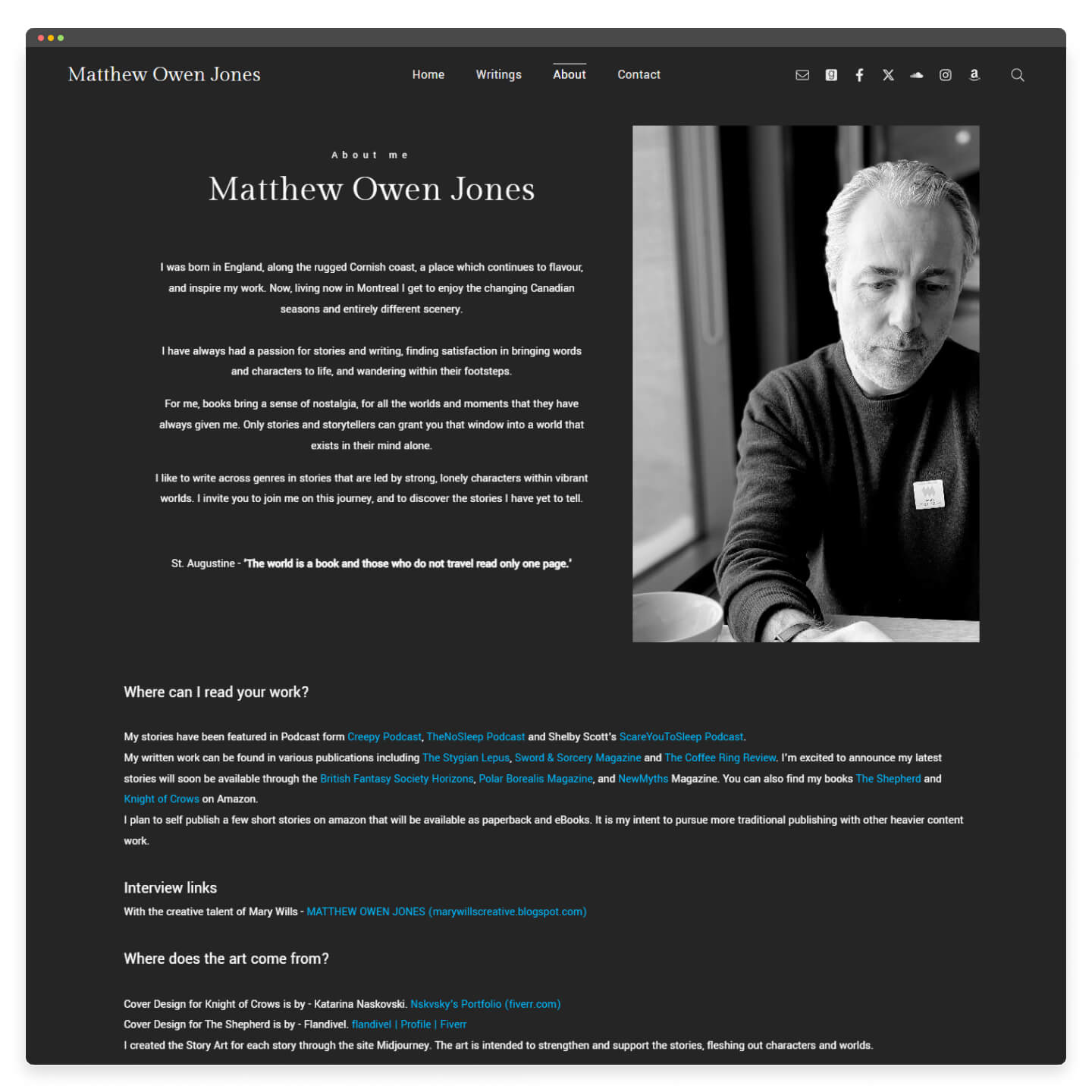
8. Write Your Author Bio
Your bio tells clients who you are. Keep the tone in line with the rest of your writing. Add your top credentials, awards, and any well-known clients or publications. A short story about why you became a writer can help people connect with you. The best author websites show how others handle theirs.
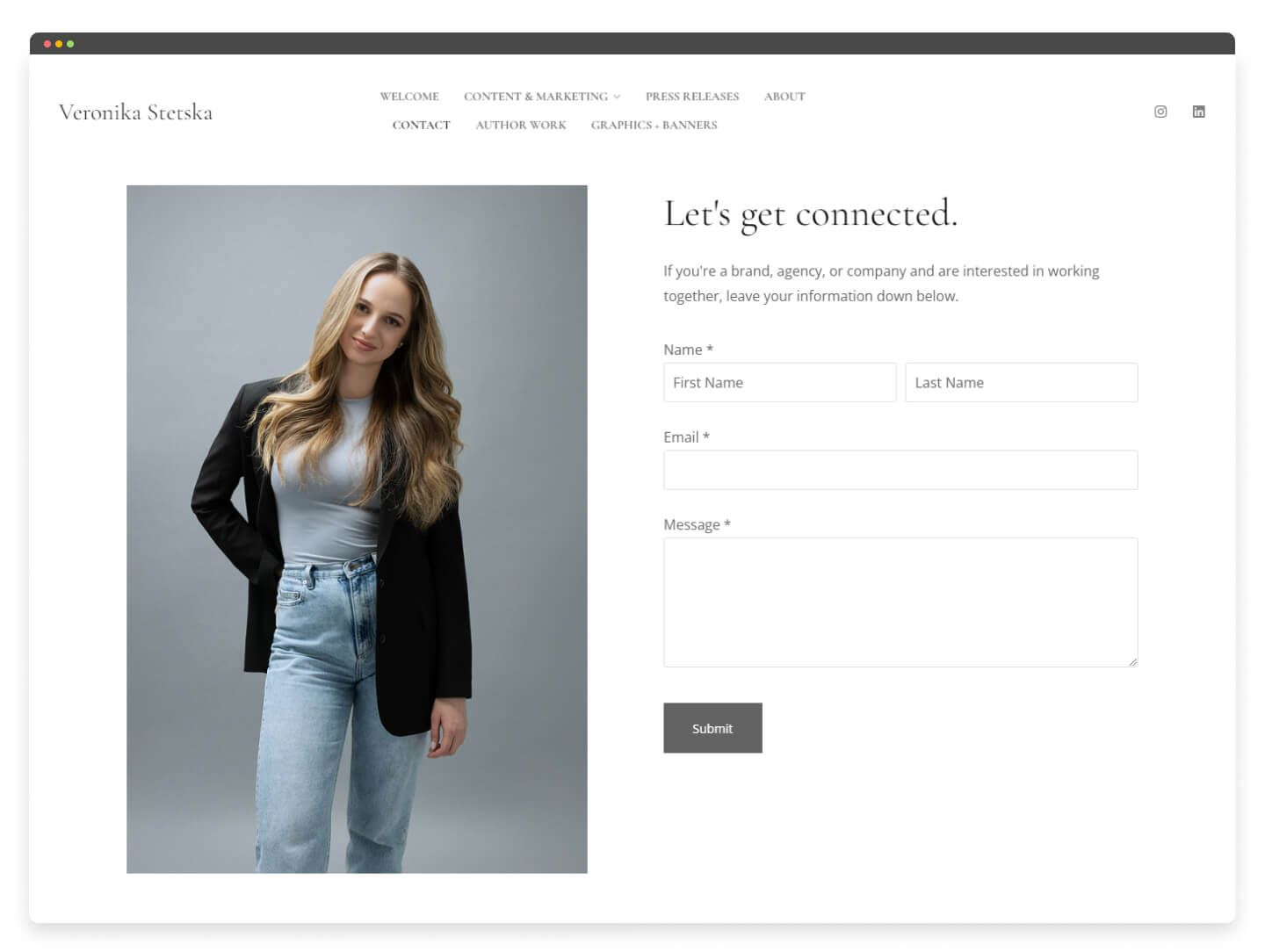
9. Add a Contact Page
End with a contact page. Add your email, your social links, and a simple contact form. Keep it easy to find, and link to it from your other pages. Test your form so messages reach you and don't land in spam. A few contact page examples show the layout that works best.
What If You Have No Writing Experience Yet?
You don't need paid clients to start a portfolio. You need samples, and you can create those yourself. Here's how writers build a first portfolio from scratch:
- Write spec pieces. Pick a brand, blog, or publication you'd love to write for, then write a real piece as if they hired you: a blog post, a product description, a newsletter. It shows range even though no one paid for it.
- Publish on your own. Start a simple blog, or post on Medium or LinkedIn. Now you have live work with a real link, which counts for more than a file on your computer.
- Trade a few pieces for a byline. Offer one or two free or low-cost pieces to a small business, a nonprofit, or a local group. Ask for a short testimonial and a credit in return.
- Repurpose what you have. A strong school essay, a work report, or a post that did well can be cleaned up into a sample. Old writing counts if it's good.
- Guest post in your niche. Smaller sites and blogs often take contributor pieces. One published byline gives you both a sample and a bit of proof.
Aim for three to five strong pieces before you worry about adding more. A few sharp samples beat a long list of filler.
What Should You Include in a Writing Portfolio?
A portfolio needs enough to prove your skills, and little enough that a busy editor can judge you in two minutes. Here's what to add.
| What to include | Why it matters |
|---|---|
| 3 to 6 writing samples | Enough to show your range. More than six and readers stop. Fewer than three and you look untested. |
| A short bio | Says who you write for and what you do, in two or three sentences. |
| Your niche and services | Names the work you take on and the industries you know. Being specific helps clients choose you. |
| Context for each sample | A line on the client, the task, and the result. An outcome tells more than the piece alone. |
| Testimonials | One or two client quotes about what you were like to work with. |
| Contact details | An email and a working form, easy to find on every page. |
| Links to live work | A link to the published piece. A real byline carries more weight than a file. |
Keep the order simple: samples first, proof second, contact always in view.
What Format Should Your Portfolio Be?
For most writers, a simple website beats a PDF or a shared doc. A site is easy to update, share, and find on Google. Here's how the main formats compare.
| Format | Best for | Watch out for |
|---|---|---|
| Website | Your main portfolio. Easy to share, update, and find online. | Takes a little time to set up the first time. |
| A backup for job applications that ask for a file. | Goes out of date fast and is hard to track. | |
| Google Doc or link | A quick share when someone asks on the spot. | Looks less polished and gives you no design control. |
A simple site works best: a home page, a work page, an about page, and a contact page. Link out to your published pieces so editors read them where they ran. Keep a one-page PDF as a backup, but treat the site as your main home.
Before you start building, it helps to see how other writers set theirs up. We keep a gallery of writing portfolio examples built on Pixpa, from copywriters and authors to journalists and poets, with the template behind each one.
Common Portfolio Mistakes to Avoid
A few small errors can lose you a client before they read a word. Watch for these:
- No clear focus. Trying to appeal to everyone makes you look ready for no one.
- Too many samples. A wall of links buries your best pieces. Show your strongest few.
- Broken links. One dead click looks careless. Check every link before you share.
- Hard-to-find contact details. If someone has to hunt for your email, they move on.
- Samples with no context. A piece on its own says little. Add a line on the client and the result.
- A site that breaks on phones. Many editors open your work on a phone first. Test it there.
Ready to Build Yours?
The steps are simple. The hard part is starting, so pick a builder and put up a rough version this week. You can add work and polish it as you go.
Frequently Asked Questions
How Do You Show Your Work as a Writer?
A writing portfolio website is the best way to show your work, especially if you freelance. It helps you stand out and gives clients or editors the details they need to judge you.
What Is the Easiest Site to Build a Portfolio On?
A website builder is the easiest option. With Pixpa, you pick from a library of templates and build your site by dragging and dropping. It also includes a blog, SEO tools, and other features to help people find you.
Do You Need to Pay for a Writing Portfolio Website?
No. You can start for free on sites like Medium or LinkedIn, or with the free plan on many website builders. Free options are a fine way to begin. A paid plan is worth it once you want your own domain name, more design control, and a site with no other brand's ads on it.
Nikhil Prabha is a content specialist at Pixpa who writes about portfolios, photography, and running a creative business. He has published guides on building portfolios across photography, fashion, and design, and on the mistakes that hold them back. He focuses on turning complicated topics into steps a beginner can actually follow. Outside work, he's into sneakers and the outdoors.
Connect on LinkedIn.